Telangana Meeseva New User Login Profile Registration process & guide to use Mee-seva Citizen Online services & application forms, Online payments & Challans.
Government of Telangana leads all the other states in providing Online Citizen services. The G2C platform is called mee-seva and it has more than 10000+ franchises opened in all corners of the state. Every Municipal corporation & village at-least have a government operated Meeseva Kendra in Telangana.
Citizens of Telangana States are required to register their login profile in ts.meeseva.telangana.gov.in website. Online application current status can be checked without profile login. A working mobile number and email id can be used for profile creation.
Requirements for TS Meeseva User Profile Registration:
Meeseva login Id is created same as Mobile number.
Email Id for communication.
ID proof and Address Proof document. (Aadhar UID card, Govt Issued ID card, Driving License & Passport for NRI people)
Passport Size Photo for image upload.
Steps to register TS Meeseva Website user Login Profile Online:
visit official website https://meeseva.telangana.gov.in and select Register User option.
An online application form with login creation information is opened in a new page. Now First enter mobile number of user.
Now choose and enter your desired secure password. The password should be Alpha numeric combination with a special character & different case letters.
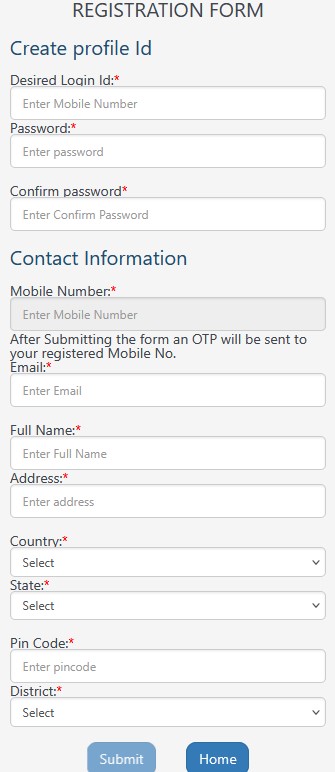
Enter Email id in below form, Fill profile name, details of Address like Street name, Door no, Village or Town Name and PIN code. Choose district from List and select Submit button.
After profile creation application is submitted now verification step is started. First is Mobile OTP verification with SMS and Email ID verification with Link received in email.
Now Enter the OTP received in your mobile number to access all the available citizen Services of TS meeseva Online website.
Reset TS Mee-seva User Login Password Online:
If you want to Reset or lost your current Meeseva Login password visit official website and select Forgot Password option in homepage.
Now enter your Mobile number which you want to reset the password.
An OTP is received via SMS and citizen need to enter it in the form. Then a new password should be entered two times in the fields and your password is reset instantly.
Steps to Login into Telangana TS Meeseva Website:
Visit MEESEVA official Home page & select Login form option in online.
Enter your registered Mobile number and password to login in to meeseva profile.
Now enter the SMS OTP received on your mobile number correctly. Once verified you will get access to all 300+ meeseva online services.